Telegram ditches SMS codes: How to sign in now

 Telegram introduces new login option (photo: Getty Images)
The Telegram messenger has begun testing a new login method without SMS codes and even without entering a phone number. In the latest beta versions of the app, the company is implementing Passkeys – cryptographic login keys stored directly on the user’s device.
RBC-Ukraine shares what is known about the new Telegram login feature.
The new function allows users to log into their accounts using a fingerprint, Face ID, or device PIN instead of a one-time SMS code. For now, this option is available only in Telegram’s beta builds for Android.
What has changed
Android beta users of Telegram have noticed a new option, ''Sign in with Passkey'', on the app’s launch screen and in Settings Privacy.
Once activated, the system calls the device’s password manager, which verifies the user’s identity using biometrics or a PIN and provides Telegram with a cryptographic key. This key effectively replaces the login, password, and one-time verification code, while remaining stored on the device itself.
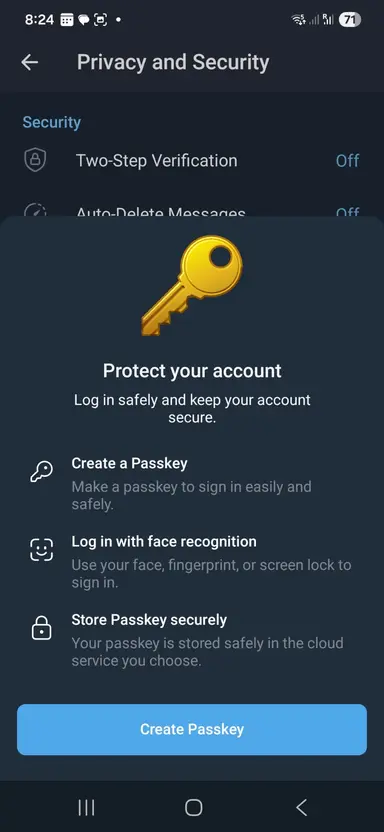
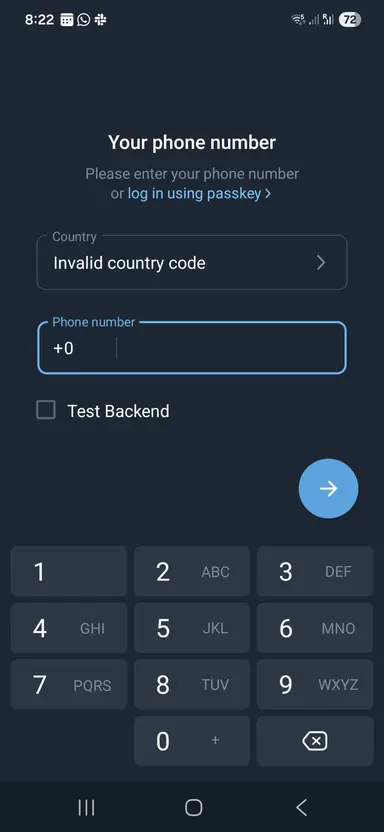
Telegram 12.2.2 introduces a new sign-in feature using Passkeys (photo: Corbado)
Why it matters
Passkeys are built on FIDO/WebAuthn standards and are considered more resistant to phishing compared with SMS codes. The private key never leaves the device, so attackers cannot intercept it, and the service does not need to send SMS messages, which are potentially vulnerable to interception or SIM-swap attacks.
Cybersecurity experts note that password- and SMS-free login is not only more secure but also more convenient for users.
How it works
The authorization key is stored locally on the user’s device, so Telegram does not need to send an SMS message to confirm login. Authorization is done via biometrics, and if a cloud password was previously set, it must be entered once.
To enable the feature, go to Telegram, Settings, Privacy.