Charger overheating analysis: Identifying standard thermal behavior vs critical failures

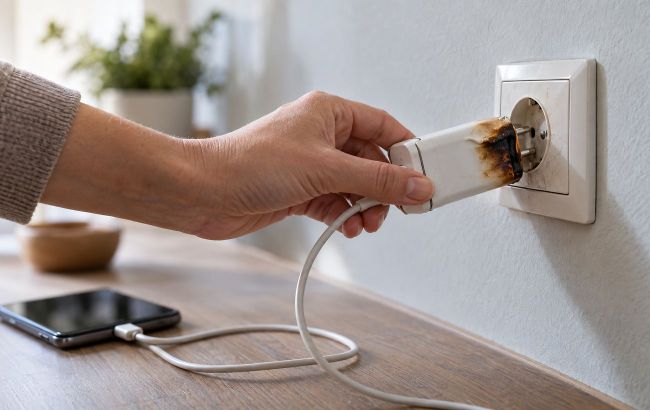 Faulty charger (photo: Styler)
A phone or laptop charger may heat up during operation - this does not always indicate a malfunction. However, unusually strong heating, a burning smell, smoke, or sparking during charging are reasons to stop using it immediately.
Here's why chargers heat up, which signs should not be ignored, and what to do in case of overheating.
Why does a charger heat up?
During charging, the adapter converts alternating current from the outlet into direct current required to power the device. Part of the energy is released as heat, so the adapter's casing may warm up.
As Samsung explains, an increase in the temperature of a smartphone and its adapter during charging is normal.
If a smartphone overheats excessively, its protection system may slow down or temporarily stop charging.
Heating alone does not mean that the adapter is faulty. It is important to pay attention to its temperature, the condition of the casing, and other unusual signs.
There is no single casing temperature that can determine a malfunction for any charger. Acceptable indicators depend on the design and characteristics of the specific model.
When does charger heating become dangerous?
The British electrical safety organization Electrical Safety First recommends regularly checking the condition of chargers, plugs, and sockets.
Stop using the charger if you notice:
- Unusually strong heating: The casing, plug, or socket has become so hot that it is difficult to touch.
- Burning smell or smoke: Possible signs of a dangerous malfunction.
- Sparking or crackling: Especially if they occur while the adapter is operating.
- Casing damage: Cracks, deformation, swelling, or signs of melting.
- Scorch marks: Darkening of the plastic or discoloration of the plug or socket.
Do not check for heating by touch if you see smoke, sparks, or signs of melting. Disconnect the adapter from the socket only when it is safe to do so.
Another dangerous sign is the repeated tripping of the circuit breaker during charging.
If the socket itself heats up, sparks, or shows scorch marks, stop using it and contact a qualified electrician.
A brief spark at the plug contacts when connecting the adapter to the socket is sometimes normal, Apple explains. However, if sparking occurs outside the plug contacts, repeats during operation, or is accompanied by damage, you must stop using the adapter.
Do not leave the charger on a bed or under a blanket
Sufficient air circulation is required for the safe operation of the adapter.
Google’s safety rules for its 45W charger state that the adapter and the device it is charging must be in a well-ventilated area.
Do not cover the charging block with a blanket, pillow, towel, or clothing. This prevents heat dissipation.
If you are using a laptop charging block with a power cable, place it on an open, hard surface according to the manufacturer's instructions.
Leave the phone on a hard, flat surface while charging, not on a bed, sofa, or among bedding.
Check the cable and charging port
The cause of dangerous heating may be not only the adapter but also a damaged cable or the device's port.
Google’s safety rules for Pixel 10 smartphones state that using damaged cables and adapters, as well as charging in the presence of moisture, can lead to fire, electric shock, or equipment damage.
Inspect the cable before charging: there should be no exposed wires, cracks, or damaged insulation.
The plug should fit securely into the port without excessive force. If you have to constantly adjust the cable to prevent charging interruptions, stop using it.
If your smartphone reports moisture in the port, disconnect the cable. Do not reconnect it until the port and plug are dry.
Use compatible chargers
Not every adapter is equally suitable for all phones, tablets, and laptops.
Before use, check the compatibility of the adapter and cable with your device, including supported charging standards and specifications indicated by the manufacturer.
According to the USB Implementers Forum, the organization that develops USB specifications, USB Power Delivery technology allows compatible devices to negotiate power parameters based on their needs.
Therefore, high adapter power alone does not mean it will necessarily overheat or deliver excessive power to the device.
For example, Apple explains in its recommendations that Mac laptops with USB-C charging can work with USB Power Delivery adapters of various powers. However, for the best charging speed, the manufacturer recommends using an adapter with power no less than recommended for the specific model.
Buy chargers from verified sellers and pay attention to information about the manufacturer, model, and technical specifications.
Do not leave charging unattended
Electrical Safety First experts recommend not leaving phones and tablets charging while sleeping or unattended.
After charging is complete, disconnect the adapter from the power supply.
Also, do not charge equipment near heat sources, in direct sunlight, or where water may get on it.
What to do if the charger overheats
If the adapter becomes unusually hot, stop charging and, if it is safe, disconnect it from the power supply.
Do not touch the adapter or socket if they are smoking, sparking, or show signs of melting.
Wait for the device to cool down naturally. Do not cover it or try to cool it with water.
If the adapter has a burning smell, signs of melting, a damaged casing, or other signs of malfunction, do not use it again even after cooling.
Contact the manufacturer or service center for inspection or replace the device. Do not disassemble or repair a faulty adapter yourself.
If it is safe, turn off the electricity at the distribution panel. Do not try to disconnect the charger from the socket if it poses a risk of electric shock.
Do not extinguish an energized electrical appliance with water. This can lead to electric shock.
If fire or smoke spreads rapidly, leave the premises immediately and warn others of the danger. Do not try to extinguish a large fire yourself.